I Built a Fuel Gauge for Claude Code
The number nobody shows you
I leave Claude Code open all day. Somewhere in the afternoon a session that started fast turns into one that costs a lot per message, and the only meter I had was the account level one that says how much of my plan I've used this week.
That number is real, but it's the wrong shape. It tells me I spent a lot. It doesn't tell me which session spent it, or that the session I'm sitting in right now is the problem.
So I wrote Vizzer, a VS Code extension that puts the per-session number where I can see it, and then does something about it.
Every message pays for the whole conversation
Here's the part that surprised me when I first worked it out.
A chat model has no memory between turns. Every time you send a message, the client re-sends the entire conversation so far. So a session carrying 400k tokens of context costs roughly 400k input tokens per turn, cached or not. Caching makes each token cheaper. It does not make there be fewer of them.
Which means the cost of a session isn't linear in how long you talk.
c = tokens the context grows by on an average turn
n = number of turns

turn k re-sends about    k * c

the whole session        c * (1 + 2 + ... + n)
                       = c * n(n+1)/2
                       ≈ c * n² / 2
Quadratic. A session twice as long costs about four times as much. That is the whole reason one long afternoon feels different from two short ones.
And it points straight at the fix. Split the same n turns across k sessions:
k sessions of n/k turns each

  k * [ c * (n/k)² / 2 ]  =  c * n² / (2k)
Cut the session in half and you pay half. Cut it in three and you pay a third. You're not doing less work. You're just not re-sending the morning every time you ask about the afternoon.
That's the idea. The rest is making it happen without any effort on my part.
First, a meter
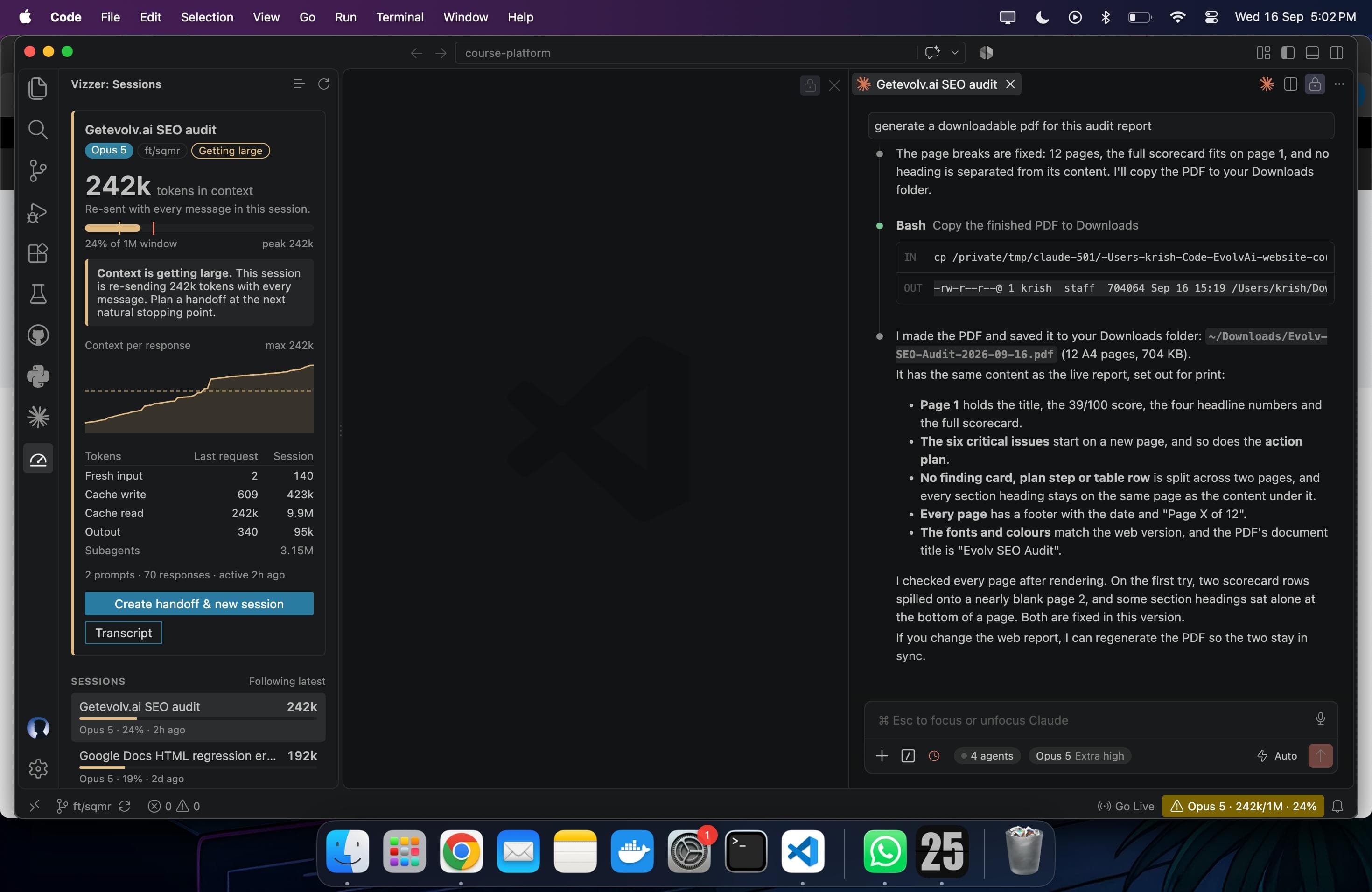
Status bar, always on: Opus 5 · 182k/1M · 18%. It goes yellow, then red. Hover it and you get the breakdown for the last request and for the session: fresh input, cache write, cache read, output.
There's a sidebar panel for when that isn't enough. A context gauge, a per-response chart with compactions marked, token totals, subagent usage, and a list of every recent session in the workspace so you can click one and pin it.
Getting those numbers is less glamorous than it sounds. Claude Code stores each session as an append-only JSONL transcript under ~/.claude/projects/, and every assistant entry records the model and the API's token usage. Vizzer finds the transcript folders for your workspace, tails them with fs.watch so it only ever reads the new bytes, and counts each API message once, which matters because Claude Code writes one entry per streamed content block.
Current context is input + cache_creation + cache_read of the latest main conversation request. That's the same formula Claude Code's own status line uses, so the two agree. Subagent traffic is counted separately, because it costs you money but doesn't sit in your context.
Vizzer only reads ~/.claude. It never writes there.
One thing I couldn't do properly: the transcript never records the context window size. Nothing in the file says whether you're on 200k or 1M. So Vizzer infers it from the model and flips to 1M once a session goes past 200k, with a vizzer.contextWindowOverride setting for when that guess is wrong. The absolute token thresholds still protect you either way. I'd rather tell you it's a guess than pretend.
A meter that only nags is useless
Vizzer warns once when a session re-sends more than 150k tokens per message or fills 60% of its window, and calls it critical at 300k or 80%. Warnings snooze and mute per session, because a tool that shouts at you every turn gets uninstalled.
But a warning on its own is a bit rude. The fix is "start a new session", and starting one by hand means retyping everything you and the model worked out over the last two hours. Most people don't bother, which is why the warning is worthless without this next part.
  long session                         fresh session
      |                                     ^
      | 1. condense locally                 |
      v    goal, recent work,               | 4. new tab, prompt
   digest  files edited, todos              |    pre-filled for you
      |    budget: 60k tokens               |
      | 2. claude -p --model opus           |
      v    your own login, no API key       |
  handoff.md ------ 3. saved and opened ----+
One click. Vizzer condenses the transcript locally into a digest that fits the handoff model's window, runs claude -p --model opus through your existing Claude Code login, saves the result into .vizzer/handoffs/, opens it so you can read it, then opens a new Claude Code tab with a prompt pre-filled to continue from it. You press Enter.
Opus writes them by default, because the one document the next session is going to read is worth the good model. Sonnet is the faster middle ground, Haiku is the cheap one, and you can type any model ID you like.
What the numbers say
Same 14-turn coding task, two copies of the repo, Sonnet 5 doing the work in both. One run kept a single session. The other took a handoff after turn 7, written by Haiku.
| Metric | Without | With | Change |
|---|---|---|---|
| Context at the last turn | 137k | 85k | 38% lower |
| Tokens processed, turns 8 to 14 | 4.32M | 2.57M | 41% lower |
| Estimated cost, whole task | $3.15 | $2.69 | 15% lower |
| Model time | 8.5 min | 10.6 min | 25% higher |
| Final-summary recall | 10/10 | 6/10 | 4 worse |
The handoff itself cost two cents and took 36 seconds.
Now read the bottom two rows, because they're the honest part.
It is slower, not faster. A shorter context doesn't make the model quicker here, and you've added a handoff call and a few more requests on top. You're buying tokens back, not time.
The last row is a real loss. That's how many of 10 identifiers created during the task the final summary mentions. The fresh session finished the work and passed the tests, but it never knew about four things the first session did, so it didn't mention them. Context you drop is context you dropped. The digest keeps the goal, the recent work, the files touched and the todo list. It doesn't keep everything, and whatever it leaves out is gone.
So the claim isn't that handoffs are free. It's that for a session you're going to pay for on a curve, a handoff at the right moment costs you two cents and some recall, and saves a good deal more than that.
The takeaway
The thing I keep coming back to isn't the extension. It's that this was an expensive resource with no gauge on it, and unmeasured resources get wasted by default, in every system I've ever worked on.
I didn't change how I use Claude Code because I read something clever about context windows. I changed because a number in the corner of my editor went red, and that turned out to be enough.
Code is on GitHub, MIT licensed, TypeScript. It's on the VS Code marketplace and works in Cursor and Windsurf too.